


AutoCodes Tech
4.15.00 Reviews
App Specs
- Version
- 2.5.3
- Updated On
- License
- Free
- Downloads
- 10,000+
- Developer
- AutoCodes.com
- Categories
- Auto & Vehicles
- Platform
- Android
Screenshots
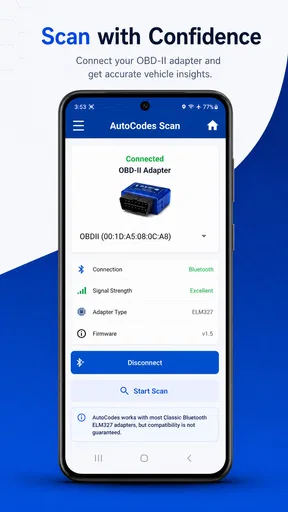
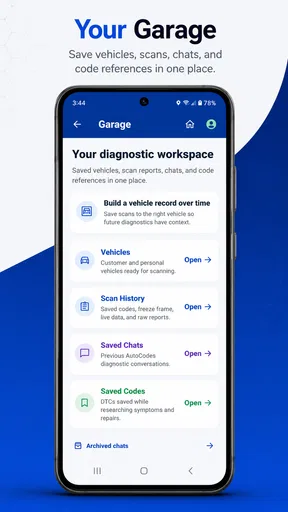
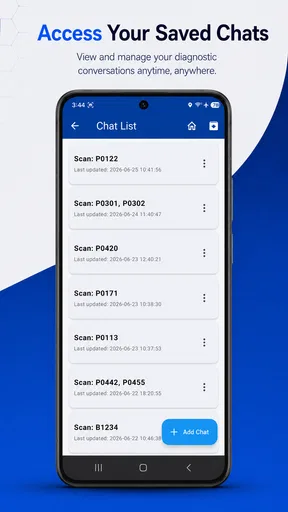
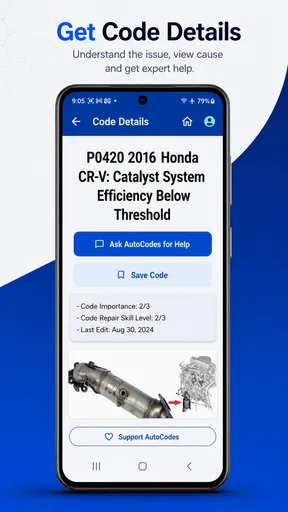
 Analysis by AppCompare
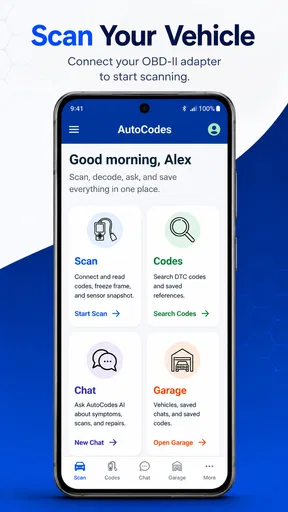
When a warning light appears on the dashboard, the hardest part is often not finding a possible fault code but understanding what to do next. AutoCodes Tech is built for that moment. It is an Auto & Vehicles app from AutoCodes.com that combines OBDII troubleshooting with an AI chat tool aimed at mechanics and people who prefer to handle basic diagnosis themselves. I found its appeal less in replacing a workshop and more in helping turn confusing diagnostic information into a sensible first plan.
The app is free to install, with optional in-app purchases ranging from $0.99 to $4.99 per item. It is rated for Everyone, works on Android 7.0 and newer, and its current version is 2.5.3. The project is still relatively small in reach, with over 10 thousand installs, but its average rating is 4.1 from around 42 ratings. That gives me the impression of a useful specialist tool that is attracting a focused audience rather than a universal car app used by everyone.
What to consider before choosing a diagnostic app
My first decision point would be your actual goal. If you want to read a code, clear a light, and immediately receive a guaranteed repair answer, no phone app should be treated as a complete substitute for proper testing. A code identifies a system or symptom; it does not always identify the failed part. AutoCodes Tech makes more sense when you want help interpreting the code, organizing symptoms, and deciding which checks are reasonable before spending money.
The second question is whether you already use an OBDII adapter. The application is described as an OBDII troubleshooter and chat tool, so its usefulness depends on having compatible diagnostic hardware and a vehicle that communicates through the expected system. The phone alone cannot inspect a sensor, test a wire, measure fuel pressure, or confirm a mechanical failure. I would therefore treat the app as the reasoning layer around a diagnostic process, not as the complete process itself.
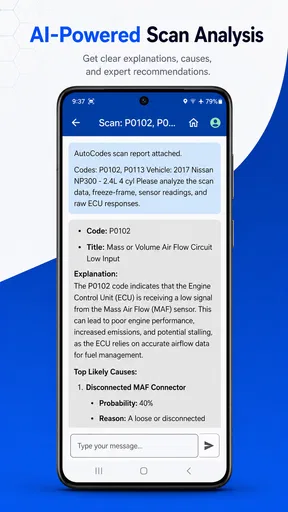
A third consideration is how comfortable you are describing a problem. An AI chat tool becomes more helpful when you provide useful context: the exact code, the vehicle symptoms, whether the engine is cold or warm, when the issue started, and whether any recent work was done. A vague question such as “my car is broken” leaves too much room for a generic answer. A carefully prepared question can make the conversation far more practical.
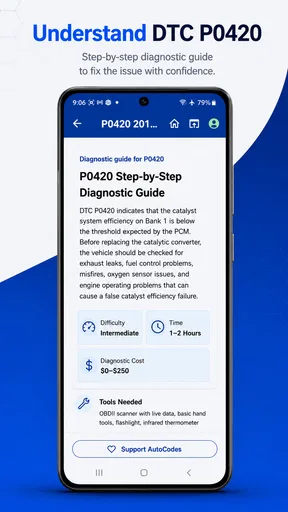
I also pay attention to how an app fits into a real repair routine. A good troubleshooting aid should help me move from a dashboard message to a sequence of checks. It should also make it clear when I am out of my depth. With this kind of tool, the best result is not necessarily a confident-sounding diagnosis. The best result is a safer next step, such as inspecting a connector, checking a basic condition, or deciding that the vehicle needs professional testing.
How I would use it during a warning-light problem
My preferred workflow starts before opening the chat. I would photograph the dashboard, note whether the vehicle drives normally, and record any changes in starting, idling, acceleration, braking, or fuel use. Then I would connect an OBDII reader, copy the code exactly, and include the vehicle details and symptoms in the conversation. This prevents the app from having to guess what I already know.
Worth Reading Before You Choose

EA SPORTS FC Mobile 26 Is a Bigger Football Game, but It Takes Time

Flipboard Shows What News Apps Must Do Beyond the Feed

Switching to Android Auto Means Rethinking Your Driving Routine

Google Calendar Makes a Crowded Week Easier to Manage

Ludo King Makes the Most of the Minutes Between Plans

Baby Panda World Brings Quick Play to Modern Phones, but Its Game Library Feels Busy
The useful habit is to ask for a diagnostic order rather than a single part recommendation. For example, I would ask which simple causes should be checked first, what result would point toward each cause, and which symptoms would make driving unsafe. That style of question turns AutoCodes Tech into a checklist assistant. It also reduces the temptation to buy the first replacement component mentioned by a code lookup.
Another practical tip is to keep the original code and any later code separate. Clearing a warning light too early can remove useful evidence, and a code that returns after a short drive may tell a different story from one that appeared only once. I would use the app to discuss the sequence of events, not just the final code. That context is especially valuable when a vehicle has intermittent symptoms.
For a realistic everyday example, imagine a car that starts normally but develops a rough idle after a cold morning. An OBDII scan produces a fault code, yet the vehicle still seems driveable. I would enter the code, describe the cold-start behavior, mention whether the light is steady or flashing, and ask for checks in order of difficulty and risk. The response could help me distinguish between a sensible inspection and a repair that should be left to a technician. I would still verify the advice with the vehicle manual and physical tests before replacing anything.
Where AutoCodes Tech is especially useful
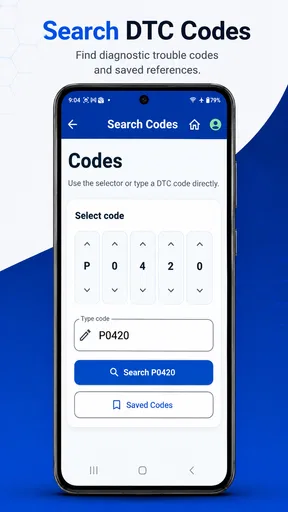
The strongest part of this app is the combination of code-oriented troubleshooting and conversational explanation. Traditional code databases are quick, but they often stop at a short definition. A chat format gives me room to add symptoms and ask follow-up questions. That matters because the same general fault area can involve several possible causes, and the right next check depends on the circumstances.
I also like the way this format can support different levels of experience. A DIY owner can ask for plain-language explanations, while a mechanic can use the conversation to organize possibilities or clarify a diagnostic path. It is not necessary to remember every abbreviation before starting. The more technical the question becomes, however, the more important it is to provide accurate vehicle and test information.
For someone who maintains an older vehicle, the app can serve as a preparation tool before visiting a garage. I would use it to understand the terminology, list the symptoms clearly, and prepare questions about a proposed repair. That does not mean challenging a technician with an AI answer; it means arriving better informed and less likely to confuse a code description with proof of a failed part.
It may also help a small workshop or mobile mechanic during the information-gathering stage. A technician can use a conversational prompt to structure an initial inspection, especially when a customer provides a messy description of what happened. The app should not replace service information, wiring diagrams, manufacturer procedures, or professional scan equipment, but it can help turn an unstructured complaint into a more usable starting point.
A less obvious advantage is that the conversation can preserve the reasoning behind a decision. Instead of searching the same code repeatedly and opening unrelated pages, I can ask follow-up questions about the symptoms already entered. That continuity is useful when the first simple check does not solve the problem. It encourages a process of narrowing possibilities rather than jumping from one isolated search result to another.
Where the usual alternatives may fit better
AutoCodes Tech is not automatically the best choice for every driver. A basic code reader with a clear, vehicle-specific manual may be enough for someone who only wants to identify a warning code. If the user does not want an AI conversation and prefers direct reference material, a conventional code database or repair manual may feel faster and more predictable.
Professional scan equipment is the better option when the problem involves live data, system tests, module communication, advanced vehicle networks, or manufacturer-specific functions. An app can help explain information, but it cannot create access to tests that the adapter and vehicle do not support. For complicated electrical faults or safety-related systems, I would choose a qualified technician over a phone-based interpretation every time.
There is also a difference between diagnosis and repair instruction. A video-focused repair app may be more useful when I already know the failed component and need to see how to remove it. A parts catalog may be better when I need fitment information. AutoCodes Tech is aimed more at understanding and troubleshooting than at replacing a full repair ecosystem.
Drivers who dislike typing detailed descriptions may find the chat approach less convenient than a simple scan-and-display tool. The quality of the exchange depends on the quality of the input, and that creates a real trade-off. The flexibility of conversation is valuable, but it also demands more attention than tapping a code and reading a short definition.
I would be cautious about using any answer as permission to continue driving. A flashing warning light, loss of braking ability, overheating, smoke, fuel smell, severe vibration, or major loss of power deserves immediate safety judgment, not extended experimentation in a chat. The app can help formulate questions, but it should never override the vehicle’s symptoms or a professional inspection.
What the free model means in everyday use
The free entry point makes it easy to try the workflow without committing to a paid diagnostic service. That is useful for occasional owners who may only need guidance when a warning light appears. The optional purchases, priced from $0.99 to $4.99 per item, are worth considering before building your entire maintenance routine around the app. I would first test how well the free experience handles my own vehicle, my adapter, and the kind of questions I normally ask.
The cost is not only financial. Switching from a familiar code website or paper manual means changing how I collect information. I would need to keep the exact code, vehicle details, symptoms, and previous checks in one place. That small preparation cost pays off because it gives the chat enough context to be useful. Without it, moving to a new tool may feel like extra work rather than an improvement.
There is also a confidence cost. A fluent answer can sound more certain than the evidence allows. I would actively look for statements that distinguish a likely cause from a confirmed cause, and I would ask what test could prove or disprove the suggestion. This is an important habit with AI-assisted troubleshooting: use it to improve the questions you ask, not to skip the verification stage.
Version 2.5.3 is the current release I reviewed, and the minimum Android requirement of 7.0 keeps the technical barrier fairly low for compatible Android phones. That does not guarantee that every adapter, vehicle, or phone combination will behave identically, so I would check the hardware setup before relying on it for a roadside situation. A diagnostic app is most valuable when it has already been tested calmly at home.
Who should install it, and who should skip it
I would recommend AutoCodes Tech to a DIY driver who owns or is willing to use an OBDII reader, wants explanations rather than isolated code definitions, and is prepared to verify advice with sensible checks. It is also a good fit for someone who wants to speak more confidently with a repair shop without pretending to become a technician overnight.
It could suit a mechanic as a supplementary thinking tool, particularly during the early stage of gathering symptoms. The app’s chat format may help organize a customer’s description or suggest questions worth asking. I would still keep professional diagnostic equipment and manufacturer documentation at the center of serious work.
I would skip it if I expect a guaranteed diagnosis from a code alone, if I have no interest in entering detailed symptoms, or if I am dealing with an urgent safety fault. I would also choose a conventional repair guide when my problem is already identified and I simply need a precise, illustrated procedure. In those situations, the conversational troubleshooting layer may add little value.
The app’s audience size is modest, with over 10 thousand installs, but the 4.1 average from around 42 ratings suggests that users who do try it generally find a worthwhile idea in the experience. I would not treat that rating as proof that it will solve every vehicle problem. Instead, I see it as a reason to try the tool with a non-urgent issue and judge whether its explanations fit my own way of working.
My recommendation after using the troubleshooting approach
AutoCodes Tech earns a place on my shortlist because it addresses the gap between a raw OBDII code and a sensible conversation about what to check next. Its developer, AutoCodes.com, has positioned it for both mechanics and DIY users, and that mixed audience explains the app’s most useful quality: it can be as simple or as technical as the information I provide.
My main advice is to use it as a diagnostic companion, never as the final authority. Start with a non-urgent warning, enter the exact code and symptoms, ask for an ordered testing plan, and confirm each important suggestion before buying parts or continuing to drive. That workflow makes the app more valuable than a one-line code lookup while keeping expectations realistic.
For a free Auto & Vehicles app with optional low-cost purchases, it is an appealing experiment for Android users who want practical help around OBDII troubleshooting. It will not replace a workshop, a service manual, or proper test equipment, and users seeking instant answers may prefer a simpler alternative. But if you want to understand what your car may be telling you and prepare better questions before taking action, AutoCodes Tech is a sensible tool to try.
Pros
- Quick access to vehicle diagnostic codes and technical references.
- Useful for technicians needing information while working in the garage.
- Search tools can help locate relevant codes faster than paper manuals.
- Portable reference that is available directly on an Android or iOS device.
- May reduce dependence on multiple printed repair guides.
Cons
- Coverage may vary by vehicle make
- model
- and production year.
- Some explanations may be too technical for inexperienced car owners.
- An internet connection may be required for certain content or features.
- Information should be verified before making safety-critical repairs.
- The interface may feel dated compared with newer automotive apps.
FAQs for AutoCodes Tech
What is AutoCodes Tech and what can I use it for?
AutoCodes Tech is designed to help users find and manage automotive-related information, such as vehicle codes, technical references, or diagnostic details, depending on the available tools in the app. Its main value is convenience: instead of searching through scattered websites or manuals, users can access relevant information from one place. Before downloading, check the current store description to confirm which vehicle brands, code categories, and functions are supported.
Is AutoCodes Tech suitable for beginners, or is it intended for professional mechanics?
The app can be useful for both vehicle owners and automotive professionals, but the experience may differ depending on your technical knowledge. Beginners can use it as a reference when researching warning codes or basic vehicle information, while mechanics may appreciate quicker access during troubleshooting. However, AutoCodes Tech should not replace a qualified inspection, repair manual, or professional diagnostic equipment when a vehicle problem could affect safety.
Does AutoCodes Tech work without an internet connection?
Offline availability depends on the specific section and version of AutoCodes Tech. Some applications store basic databases locally, while others require an internet connection to search, update information, load advertisements, or access complete technical details. If you plan to use the app in a garage or on the roadside, review its permissions and store listing carefully, then test the important features before relying on it away from Wi-Fi or mobile data.
Is AutoCodes Tech free to download, and are there in-app purchases or advertisements?
AutoCodes Tech may be available as a free download, but the total experience can include advertising, optional purchases, subscriptions, or limitations on certain features. Pricing and availability can vary between Android and iOS and may also change after updates. Before installing, examine the relevant app-store section for in-app purchase information. This will help you understand whether advanced databases, ad removal, or additional tools require payment.
Is the information provided by AutoCodes Tech accurate enough for vehicle repairs?
AutoCodes Tech can be a helpful starting point for understanding automotive codes and researching possible causes, but its results should be treated as reference information rather than a definitive diagnosis. A single code may have several causes, including wiring, sensors, software, or mechanical faults. Always verify important findings with reliable manufacturer documentation and, when necessary, consult a qualified technician before replacing parts or driving an unsafe vehicle.


